 |
uvi-script
Musical event scripting with Lua
|
|
uvi-script
Musical event scripting with Lua
|
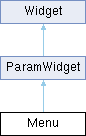
Public Member Functions | |
| Menu (string name, table items, int defaultValue) | |
| creates a menu widget on the user interface. | |
| int | addItem (string name) |
| add a menu item. | |
| void | setItem (int index, string name) |
| setItem text for a given index. | |
| void | setValue (number value, bool callChangedCallback=true) |
| void | clear () |
| clear the menu entries. | |
| string | getText (int index) |
Public Attributes | |
| int | paramId |
| paramter id | |
| int | length |
| size of the menu | |
| int | value |
| selected index | |
| int | selected |
| selected index | |
| string | selectedText |
| selected text | |
| string | text |
| selected text | |
| number | fontSize |
| font size | |
| string | font |
| path to TrueType font | |
| string | popupFont |
| path to TrueType font for the popup menu | |
| number | popupFontSize |
| popup menu font size | |
| table | items |
| table of item names | |
| string | align |
| text alignement: "centred" | "left"| "right" | "top" | "bottom" | "topLeft" | "topRight" | "bottomLeft" | "bottomRight" | |
| string | backgroundImage |
| path to background image | |
| string | backgroundColour |
| background colour: colour string that defines the desired colour. | |
| string | textColour |
| text colour: colour string that defines the desired | |
| string | outlineColour |
| outline colour: colour string that defines the desired colour. | |
| string | arrowColour |
| arrow colour: colour string that defines the desired colour. | |
| bool | displayArrow |
| show/hide the arrow on the right of the Menu, default is true | |
| string | popupBackgroundColour |
| Popup menu background colour: colour string that defines the desired colour. | |
| string | popupTextColour |
| Popup menu text colour: colour string that defines the desired colour. | |
| string | popupHighlightedBackgroundColour |
| Popup menu highlighted background colour: colour string that defines the desired colour. | |
| string | popupHighlightedTextColour |
| Popup menu highlighted text colour: | |
| int | menuHeight |
| allows to override the popup menu height. | |
| bool | hierarchical |
| allows to have sub-menus. | |
| float | minimumHorizontalScale |
| specifies the minimum amount that the font can be squashed horizontally before it starts using ellipsis. | |
 Public Attributes inherited from ParamWidget Public Attributes inherited from ParamWidget | |
| Mapper::Type | mapper |
| Mapper type, default is Mapper.Linear. | |
| Unit::Type | unit |
| Unit type, default is Unit.Generic. | |
| Public Attributes inherited from Widget | |
| string | name |
| widget name | |
| string | displayName |
| widget display name | |
| string | tooltip |
| widget tooltip, default is name | |
| int | x |
| x position in pixels | |
| int | y |
| y position in pixels | |
| int | width |
| widget width in pixels | |
| int | height |
| widget height in pixels | |
| table | size |
| widget size {width, height} | |
| table | position |
| widget position {x,y} | |
| table | bounds |
| widget bounding rect {x,y,width,height} | |
| number | alpha |
| transparency value between 0.0 and 1.0 | |
| bool | enabled |
| boolean flag to enable / disable the widget | |
| bool | visible |
| boolean flag to toggle widget visibility | |
| bool | interceptsMouseClicks |
| boolean flag to toggle mouse handling on widget | |
| bool | showLabel |
| show widgets label if any | |
| bool | persistent |
| flag to tell if the widget values should be serialized when saving. | |
| function | changed |
| callback function used by child widgets to be notified of changes | |
Menu widget.
creates a menu widget on the user interface.
| Menu::Menu | ( | string | name, |
| table | items, | ||
| int | defaultValue ) |
creates a menu widget on the user interface.
| name | the name to give to the widget |
| items | (optional) array of strings to be displayed in the menu |
| defaultValue | (optional) 1-based index of the initially selected entry, default is 1 |
| int Menu::addItem | ( | string | name | ) |
add a menu item.
| name | new menu item text |
| string Menu::getText | ( | int | index | ) |
| index | menu item index to display |
| void Menu::setItem | ( | int | index, |
| string | name ) |
setItem text for a given index.
| index | menu item index to change |
| name | new menu item text |
| void Menu::setValue | ( | number | value, |
| bool | callChangedCallback = true ) |
| value | the new widget's value |
| callChangedCallback | call the changed callback function if true |
| string Menu::arrowColour |
arrow colour: colour string that defines the desired colour.
It can be either a named colour like "blue" or "red" or an hexadecimal string in RGB ("#FF00CC") or ARGB ("#3C00FECD") format
| string Menu::backgroundColour |
background colour: colour string that defines the desired colour.
It can be either a named colour like "blue" or "red" or an hexadecimal string in RGB ("#FF00CC") or ARGB ("#3C00FECD") format
| bool Menu::hierarchical |
allows to have sub-menus.
The list should define path like entries. example: entries = { "a/1", "a/2", "a/3", "b/1", "b/2", "c/3", "foo/bar/toto", "foo/bar/tata", "foo/jo/bar"}
| int Menu::menuHeight |
allows to override the popup menu height.
Mostly useful for special cases like having a big Menu on screen, but a standard drop-down list
| float Menu::minimumHorizontalScale |
specifies the minimum amount that the font can be squashed horizontally before it starts using ellipsis.
0 for a default value. 1 for no stretching
| string Menu::outlineColour |
outline colour: colour string that defines the desired colour.
It can be either a named colour like "blue" or "red" or an hexadecimal string in RGB ("#FF00CC") or ARGB ("#3C00FECD") format
| string Menu::popupBackgroundColour |
Popup menu background colour: colour string that defines the desired colour.
It can be either a named colour like "blue" or "red" or an hexadecimal string in RGB ("#FF00CC") or ARGB ("#3C00FECD") format
| string Menu::popupHighlightedBackgroundColour |
Popup menu highlighted background colour: colour string that defines the desired colour.
It can be either a named colour like "blue" or "red" or an hexadecimal string in RGB ("#FF00CC") or ARGB ("#3C00FECD") format
| string Menu::popupHighlightedTextColour |
Popup menu highlighted text colour:
colour string that defines the desired colour. It can be either a named colour like "blue" or "red" or an hexadecimal string in RGB ("#FF00CC") or ARGB ("#3C00FECD") format
| string Menu::popupTextColour |
Popup menu text colour: colour string that defines the desired colour.
It can be either a named colour like "blue" or "red" or an hexadecimal string in RGB ("#FF00CC") or ARGB ("#3C00FECD") format
| string Menu::textColour |
text colour: colour string that defines the desired
colour. It can be either a named colour like "blue" or "red" or an hexadecimal string in RGB ("#FF00CC") or ARGB ("#3C00FECD") format