 |
uvi-script
Musical event scripting with Lua
|
|
uvi-script
Musical event scripting with Lua
|
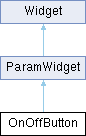
2 states boolean button. More...
Public Member Functions | |
| OnOffButton (string name, bool def) | |
| creates a stateful on/off button widget on the user interface. | |
| void | setValue (bool value, bool callChangedCallback=true) |
Public Attributes | |
| int | paramId |
| parameter id | |
| bool | exported |
| default: false, set it to true to export this parameter as an automatable parameter. | |
| bool | value |
| the button's state | |
| string | normalImage |
| image path for normal buttonState | |
| string | pressedImage |
| image path for pressed buttonState | |
| string | overImage |
| image path for over buttonState | |
| string | overPressedImage |
| image path for over and pressed buttonState | |
| string | backgroundColourOff |
| background colour Off: colour string that defines the desired colour. | |
| string | textColourOff |
| textColour Off: colour string that defines the desired colour. | |
| string | backgroundColourOn |
| background colour On: colour string that defines the desired colour. | |
| string | textColourOn |
| textColour On: colour string that defines the | |
| number | fontSize |
| font size | |
| string | font |
| path to TrueType font | |
| bool | triggeredOnMouseDown |
| Sets whether the button click should happen when the mouse is pressed or released. | |
 Public Attributes inherited from ParamWidget Public Attributes inherited from ParamWidget | |
| Mapper::Type | mapper |
| Mapper type, default is Mapper.Linear. | |
| Unit::Type | unit |
| Unit type, default is Unit.Generic. | |
| Public Attributes inherited from Widget | |
| string | name |
| widget name | |
| string | displayName |
| widget display name | |
| string | tooltip |
| widget tooltip, default is name | |
| int | x |
| x position in pixels | |
| int | y |
| y position in pixels | |
| int | width |
| widget width in pixels | |
| int | height |
| widget height in pixels | |
| table | size |
| widget size {width, height} | |
| table | position |
| widget position {x,y} | |
| table | bounds |
| widget bounding rect {x,y,width,height} | |
| number | alpha |
| transparency value between 0.0 and 1.0 | |
| bool | enabled |
| boolean flag to enable / disable the widget | |
| bool | visible |
| boolean flag to toggle widget visibility | |
| bool | interceptsMouseClicks |
| boolean flag to toggle mouse handling on widget | |
| bool | showLabel |
| show widgets label if any | |
| bool | persistent |
| flag to tell if the widget values should be serialized when saving. | |
| function | changed |
| callback function used by child widgets to be notified of changes | |
2 states boolean button.
creates a stateful on/off button widget on the user interface. Image properties support Retina @2x variants.
| OnOffButton::OnOffButton | ( | string | name, |
| bool | def ) |
creates a stateful on/off button widget on the user interface.
| name | the name to give to the widget |
| def | default value to give to the widget |
| void OnOffButton::setValue | ( | bool | value, |
| bool | callChangedCallback = true ) |
| value | the new widget's value |
| callChangedCallback | call the changed callback function if true |
| string OnOffButton::backgroundColourOff |
background colour Off: colour string that defines the desired colour.
It can be either a named colour like "blue" or "red" or an hexadecimal string in RGB ("#FF00CC") or ARGB ("#3C00FECD") format
| string OnOffButton::backgroundColourOn |
background colour On: colour string that defines the desired colour.
It can be either a named colour like "blue" or "red" or an hexadecimal string in RGB ("#FF00CC") or ARGB ("#3C00FECD") format
| string OnOffButton::textColourOff |
textColour Off: colour string that defines the desired colour.
It can be either a named colour like "blue" or "red" or an hexadecimal string in RGB ("#FF00CC") or ARGB ("#3C00FECD") format
| string OnOffButton::textColourOn |
textColour On: colour string that defines the
desired colour. It can be either a named colour like "blue" or "red" or an hexadecimal string in RGB ("#FF00CC") or ARGB ("#3C00FECD") format
| bool OnOffButton::triggeredOnMouseDown |
Sets whether the button click should happen when the mouse is pressed or released.
By default the button is only considered to have been clicked when the mouse is released